How Do I Add a List of Users to the Deltek Learning Zone?

This article explains how to bulk-load users in the Deltek Learning Zone

Need better instructions on how to get started.  I don't have access.  

Adding Bulk Users to DLZ

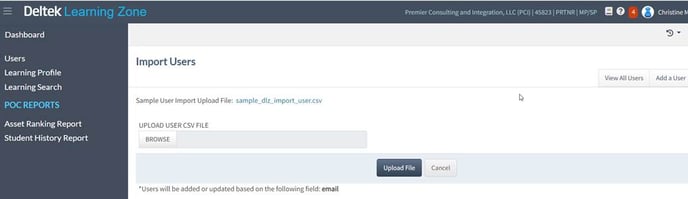
1. You should be able to bulk-load users in DLZ by populating the csv:
Deltek 
Learning Zone 
45823 i PRINR I MP/SP 
Dashboard 
Learning profile 
Learning Search 
poc REPORTS 
Asset Ranking Report 
Student History Report 
Import Users 
Sample user Import upload File: 
UPLOAD USER CSV FILE 
•users will be added or updated based on the field; email 
View All u Sets 
Add a User 
upload File

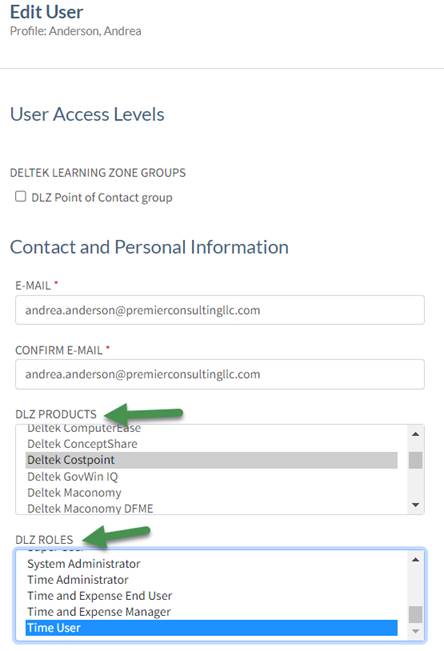
2. The fields can either be left blank or you could try “Costpoint:Time User” - it is a merge of the Product and the Role fields in the User Screen, shown below for ref:
Edit User 
profile: Anderson, Andrea 
User Access Levels 
DELTEK LEARNING ZONE GROUPS 
O DLZ Point of Contact group 
Contact and Personal Information 
E-MAIL • 
andrea.anderson@premierconsultingllc.com 
CONFIRM E-MAIL • 
andrea.anderson@premierconsultingllc.com 
PRODUCTS 
LJCItCk ComgutC SQ 
Dcltck ConccptShare 
Costpöi nt 
Deltek GovWin IQ 
Deltek Maconomy 
DLZ ROLES 
System Ad ministrator 
Time Administrator 
Time and Expense End User 
Time and Expense Manager